
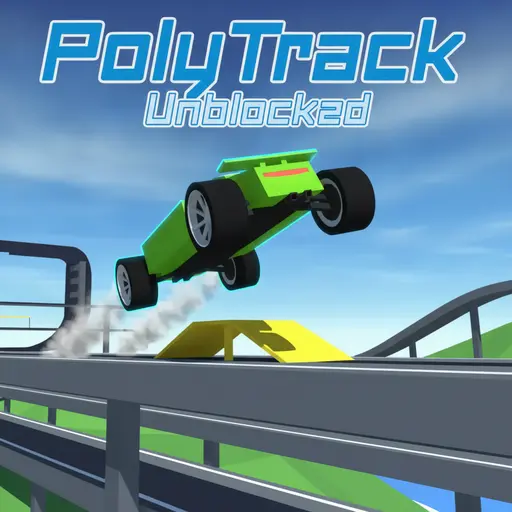
About Polytrack Unblocked
Polytrack Unblocked: Your Gateway to Instant Low-Poly Racing
Step into Polytrack, a captivating low-poly racing game developed and published by Kodub. Drawing inspiration from classic time-trial racers like TrackMania, it offers a refreshingly accessible yet deeply skill-based HTML5 experience. Players master intricate racing circuits, pushing for the shortest possible lap times while maintaining impeccable control.
Polytrack shines through its unique blend of simplicity, deep physics-based driving, and creative freedom. Its charming low-poly aesthetic and satisfying mechanics reward precision, quick reflexes, and inventive problem-solving on the track. From perfecting your drifts to designing your dream circuits, Polytrack delivers endless competitive and creative enjoyment, ideal for “unblocked” gaming solutions.
Mastering the Track: Deep Dive into Polytrack’s Physics & Mechanics
Polytrack’s seemingly simple premise belies a rich, physics-driven gameplay experience focused on skill and optimization. Success hinges on understanding and exploiting the game’s core mechanics to shave precious milliseconds off your lap times.
The Core Objective: Race Against the Clock
In Polytrack, your primary goal is simple: complete each racing circuit in the absolute shortest time possible. Every turn, jump, and straightaway presents an opportunity to optimize your run. Scoring is purely time-based, rewarding the lowest duration to reach the finish line. This creates an addictive loop of continuous self-improvement, where beating your previous best is the ultimate triumph.
Precision Driving: Drifting for Speed and Control
Drifting is a fundamental mechanic in Polytrack, crucial for maintaining speed through corners and optimizing your racing line. Initiating a drift often involves turning sharply while briefly tapping the brake or easing off the accelerator. The key is finding the sweet spot: sliding through the corner without losing too much momentum or scrubbing excessive speed. Mastering this allows you to carry higher speeds through turns, which is critical for setting top records.
- Initiation: Approach a corner at speed, turn into it, and apply a brief brake tap (S or Down Arrow) while holding the turn.
- Control: Counter-steer slightly (opposite direction of the turn) to maintain the slide without spinning out.
- Exit: Straighten the car as you exit the corner, accelerating smoothly to regain full traction and speed.
Air Control and Perfect Landings: Conquering Jumps and Loops
Polytrack features numerous physics-based jumps and gravity-defying loops that demand more than just hitting a ramp. Your car has subtle “air control,” crucial for optimal landings and maintaining momentum. When airborne, minor steering adjustments (A/D or Left/Right Arrows) affect your car’s orientation.
The goal is a smooth landing, ideally with all four wheels touching down simultaneously and aligned with the track. An uneven landing causes bounces, costing speed or leading to a crash. Use air control to correct your angle mid-air, ensuring a clean drive-away upon touchdown.
Strategic Restarts: Optimizing Every Millisecond
Polytrack embraces the time-trial philosophy with instant restarts. A minor error, suboptimal drift, or clumsy landing can cost precious fractions of a second. Instead of completing a doomed lap, instant restarts (R or Enter) empower players to relentlessly pursue perfection.
This mechanic fosters a “segment-based” approach to track mastery. Players can focus on perfecting one challenging section at a time, restarting immediately if they don’t nail it, until they string together a flawless full lap.
Unlocking Speed with Ghost Mode
One of Polytrack’s most valuable tools for improvement is its ‘Ghost Mode’. This feature displays a transparent rendition of your previous best run, or even a record-setting community ghost, directly on the track alongside you. The ghost acts as a constant, visual benchmark, allowing you to directly compare your current performance against your ideal line. By racing against your ghost, you gain invaluable insight into your driving habits and discover subtle improvements that cumulatively lead to significant reductions in lap times.
- Analyze Racing Lines: Observe where the ghost accelerates, brakes, and drifts. Pay close attention to its entry and exit points for corners.
- Identify Bottlenecks: Pinpoint specific sections where your current run significantly falls behind the ghost. Is it a slow corner, a missed drift, or a clumsy jump?
- Experiment and Compare: Try different approaches for challenging segments. The ghost provides immediate feedback on whether your new strategy is faster or slower.
- Segment Practice: Combine ghost mode with strategic restarts to repeatedly practice problematic sections until your live run consistently matches or surpasses the ghost’s performance.
PolyTrack Gameplay HD (PC) | NO COMMENTARY
Your Complete Control Guide: Drive, Build & Explore
Polytrack offers distinct control schemes for its racing and track editor modes, both designed for intuitive interaction across various platforms.
Responsive Driving Controls (Desktop & Mobile)
The driving controls are simple and responsive, allowing players to focus on mastering the track.
| Action | Desktop (Keyboard) | Mobile (Virtual Buttons) |
|---|---|---|
| Steer Left | A / Left Arrow | Virtual Left Button |
| Steer Right | D / Right Arrow | Virtual Right Button |
| Accelerate | W / Up Arrow | Virtual Up Button |
| Brake / Reverse | S / Down Arrow | Virtual Down Button |
| Restart Race | R / Enter | Virtual Restart Button |
Intuitive Track Editor Controls
The built-in track editor allows for creative expression with a streamlined control set, primarily utilizing mouse and keyboard inputs.
| Action | Desktop (Mouse/Keyboard) |
|---|---|
| Build Track Piece | Left Click |
| Move Camera | Right Click + Drag |
| Zoom Camera | Scroll Wheel |
| Adjust Height | Shift + Scroll Wheel / Z / C |
| Delete Piece | X |
| Test Track | T |
Game Modes: Race, Create, Customize
Polytrack offers a focused set of game modes that cater to both competitive racers and creative builders, ensuring a diverse and engaging experience.
Race Mode: Tackle Official & Community Challenges
In Race Mode, players face the core challenge of completing circuits in the fastest possible time. The game features official tracks designed by Kodub, offering a variety of layouts and difficulties. Beyond these, Polytrack’s community-driven aspect shines, allowing players to import and race on an ever-expanding library of custom-built tracks. This ensures a fresh supply of challenges and virtually limitless replayability, all centered around single-player time trials against the clock or ghost records.
Unleash Your Creativity: The Powerful Track Editor
One of Polytrack’s standout features is its intuitive and powerful built-in Track Editor Mode. This tool allows players to design, build, and test their very own racing circuits from scratch. With simple click-and-drag mechanics, you can piece together straightaways, corners, jumps, loops, and various other track segments. The editor facilitates a seamless creative process, allowing instant transitions to ‘test mode’ (by pressing T) to immediately try out your creations and make on-the-fly adjustments.
- Flow is Key: Ensure smooth transitions between track pieces to create a natural driving experience.
- Vary Difficulty: Mix challenging sections with easier ones to provide rhythm and allow for recovery.
- Strategic Jumps: Position jumps to encourage air control and skilled landings, not just random bounces.
- Test Thoroughly: Playtest your track repeatedly, refining difficult sections to ensure they are challenging but fair.
The editor empowers players to not only build tracks but to share them, fostering a thriving community of creators.
Personalize Your Ride: Car Customization Explained
Polytrack features a single, customizable low-poly compact racing car. While mechanical upgrades are not part of the experience, players personalize their vehicle’s aesthetic in Customize Mode. Options are limited to changing the colors of the main body paint, frame, and rims. This allows for a touch of individual flair, making your ghost uniquely recognizable on the leaderboards.
The “Unblocked” Advantage: Play Polytrack Anywhere, Anytime
Polytrack truly embodies the spirit of accessible gaming, offering multiple ways to play across a broad spectrum of devices without friction.
HTML5 Browser-Based: Instant Play, No Downloads
At its core, Polytrack is an HTML5 game, inherently designed for frictionless access. This technology allows it to run directly in your web browser, eliminating the need for any downloads, installations, or plugins. Players can jump straight into the action instantly, making it ideal for quick gaming sessions without barriers.
You can play the browser version directly via the GitHub Pages Deployment, providing a direct, developer-maintained online experience.
Broad Compatibility: PC, Mac, Chromebook, and Mobile
Thanks to its HTML5 foundation, Polytrack boasts impressive cross-platform compatibility. Whether you’re on a:
- PC (Windows, macOS, Linux): Playable in any modern web browser.
- Chromebook: Fully compatible through the browser.
- Mobile Device (Android): Playable in mobile browsers with virtual touch controls, and also available as a dedicated app.
This wide reach ensures that almost anyone with an internet connection and a compatible device can enjoy Polytrack’s fast-paced racing action.
Official Availability & Desktop Options
While primarily a browser game, Polytrack offers additional access points. The game’s official home is its itch.io page, where Kodub provides the browser version alongside downloadable desktop builds for Windows, macOS, and Linux, for those who prefer an offline or standalone experience. Android users can also download a dedicated app from the Google Play Store, optimized for mobile gameplay.
Community & Custom Content: Share Your Creations, Conquer New Worlds
Polytrack extends its replayability and fosters a vibrant community through its robust content creation and sharing features.
Saving and Sharing Custom Tracks with Unique Codes
The built-in Track Editor isn’t just for personal use; it’s designed for sharing. Polytrack supports local storage for up to 30 custom tracks, allowing players to save their creations directly on their device. Each custom track can also be exported as a unique text code.
These codes can be shared with friends or the wider Polytrack community, enabling others to import and race on custom-designed circuits. This simple yet effective system ensures a constant influx of new and challenging content from players themselves.
Climbing the Leaderboards: Compete for Glory
Polytrack’s progression system is entirely performance-based, centered around leaderboard climbing. Every official track, and many popular community tracks, offers a chance to prove your skill by setting the fastest lap times.
The thrill of optimizing your run, perfecting lines, and seeing your name (or chosen nickname) rise on leaderboards provides a powerful incentive for continuous play. This competitive element ensures there’s always a new time to beat or a higher rank to achieve.
Free-to-Play, No Strings Attached: Polytrack’s Value Proposition
Polytrack stands out with a truly player-friendly value proposition: it’s entirely free-to-play with no hidden costs or intrusive monetization. There are no documented in-game purchases, premium content, or microtransactions of any kind. Furthermore, the core itch.io version does not feature inherent in-game ads, ensuring an uninterrupted racing experience. Players can jump in, create, and compete without needing to create an account or register, making it one of the most accessible and hassle-free racing games available.
Polytrack’s Distinctive Low-Poly Aesthetic
Polytrack embraces a clean and functional low-poly visual style. This aesthetic choice is not only charming but also contributes to the game’s excellent performance and broad compatibility. The single, compact racing car, while geometrically simple, is brought to life through customizable color schemes for its body, frame, and rims, allowing for a personal touch within its minimalist design.
Games Like Polytrack Unblocked
Polytrack’s unique blend of time-trial racing and track building draws clear inspiration from the classic **TrackMania** series. Like TrackMania, it focuses on precise driving, optimizing lines, and the endless pursuit of shaving milliseconds off lap times. The instant restart mechanic and a robust track editor are also hallmarks shared with its muse. If you enjoy games centered around skill-based physics, competitive leaderboard climbing, and boundless player-created content, Polytrack offers a similar thrill.
Frequently Asked Questions About Polytrack Unblocked
Here are answers to common questions players have about Polytrack Unblocked:
Is Polytrack Unblocked free to play?
Yes, Polytrack is completely free-to-play, with no in-game purchases or costs whatsoever.
Can I play Polytrack Unblocked on my phone or Chromebook?
Absolutely! As an HTML5 browser-based game, Polytrack is compatible with PC, Mac, Linux, Chromebook, and mobile browsers. There’s also a dedicated Android app available on the Google Play Store.
Does Polytrack have multiplayer?
Polytrack does not feature real-time, collision-based multiplayer racing. However, it incorporates a “Ghost Mode” where you can race against transparent representations of your best runs or community records, and compete on leaderboards for the fastest times.
How do I create my own tracks in Polytrack?
You can create tracks using the built-in Track Editor Mode. Simply use Left Click to place track pieces, X to delete, and T to test your creation instantly. You can adjust camera, zoom, and height with Right Click + Drag, Scroll, and Shift + Scroll/Z/C respectively.
Can I save and share custom tracks?
Yes, you can save up to 30 custom tracks locally on your device. Tracks can also be exported as unique text codes, which you can share with others for them to import and play.
What are the controls for Polytrack?
For driving: use WASD or Arrow Keys for steering and acceleration/braking. Press R or Enter to instantly restart a race. Editor controls include Left Click to build, Right Click + Drag for camera, Scroll for zoom, Shift + Scroll/Z/C for height, X to delete, and T to test.
Can I customize my car in Polytrack?
Yes, you can customize your car’s aesthetics in the Customize Mode. Options are limited to changing the colors of the car’s paint, frame, and rims.
Conclusion: Polytrack Unblocked – Simple Fun, Endless Depth
Polytrack Unblocked offers an accessible yet surprisingly deep low-poly racing experience. Its HTML5 browser compatibility ensures instant, free-to-play access across a wide range of devices. The core time-trial gameplay, enhanced by precise physics-based drifting and air control, provides a satisfying skill curve. Coupled with an intuitive track editor and a vibrant community sharing custom circuits, Polytrack delivers immense replayability for both casual racers and aspiring track designers.