
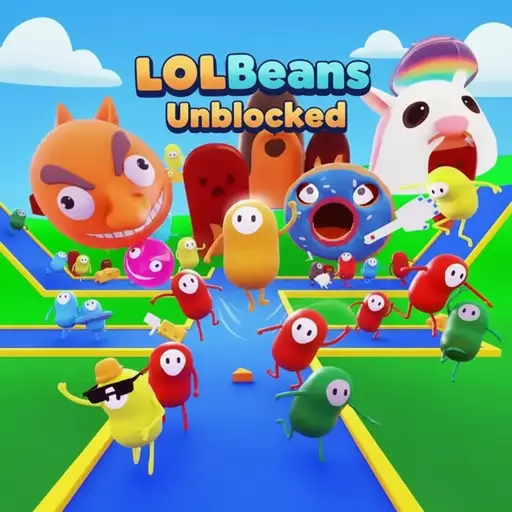
About LOLBeans Unblocked
LOLBeans Unblocked (officially titled LOLBeans.io) is a free-to-play multiplayer obstacle course platformer and battle royale game playable directly in web browsers and on mobile devices. Developed and published for the web by Big Boss Dolphin (formerly known as EXODRAGON), with an Android app edition published on the Google Play Store under SJMINAYA19, the game launched in October 2020 (variously documented across release records as October 14 or October 15, 2020). Players control customizable, jelly bean-shaped characters across physics-based obstacle courses, competing against live opponents in successive elimination rounds until a single bean crosses the final finish line to claim the crown.
Because the browser build runs natively without client installations or local file downloads, it has become a staple for quick-session competitive play on YioGames. Beyond its signature multi-round Battle Royale mode, the game features an ecosystem of secondary modes including Tag, an in-game social Lounge, a full Level Editor, and four distinct Community Level formats. Understanding how camera manipulation, jump timing, and account registration affect your control options and progression is essential for surviving early-round bottlenecks and winning finals consistently.
What Is LOLBeans.io? Core Rules and Elimination Loop
The primary objective in LOLBeans.io is to navigate hazardous obstacle courses faster than competing players, meet the qualification quota in each round, and finish first in the final stage. Every match drops a lobby of jelly bean avatars onto a starting line facing a three-dimensional track filled with moving barriers, gaps, and physics traps.
Unlike time-trial platformers where your only opponent is the clock, standard matches revolve around placement-based elimination. You do not need to finish first in the opening stages to stay alive, as long as you cross the finish line before the round’s qualification slots fill up.
The Battle Royale Structure: Qualification Quotas and Round Elimination
Each standard match follows a progressive knockout structure divided into multiple rounds. At the start of a round, a strict qualification quota determines how many of the fastest players can advance to the next stage.
- The Starting Sprint: All participating beans launch simultaneously from the starting gate into the first obstacle sequence, where dense crowd collisions immediately affect movement trajectories.
- Mid-Course Navigation: Players must jump over gaps, dodge physics-based hazards, and recover from falls, which reset the bean to the nearest valid checkpoint rather than ending the run outright.
- Quota Lockout: As each bean crosses the finish line, an active qualification counter ticks toward its limit. Once the exact quota of qualifying players is reached, the round ends immediately, and all remaining players still on the course are eliminated.
- Field Reduction: Surviving beans advance into the subsequent round, where a fresh obstacle course awaits and the qualification threshold tightens further.
This structure means that early mistakes—such as getting knocked off a narrow platform—are recoverable during the opening round when the qualification margin is wider. However, as the survivor pool shrinks in later stages, a single missed jump or poorly timed obstacle collision almost always results in elimination.
The Crown Showdown: How Final Round Victory Works
When the elimination rounds narrow the lobby down to the final group of survivors, the match transitions into the Championship Final. In this concluding stage, the qualification quota is reduced to one.
Finishing second or third in the final round yields no survival benefit; the first player to navigate the last obstacle course and touch the finish line wins the entire match and claims the crown. This victory is recorded on the player’s profile statistics alongside the coins earned from participating in the match.
Platform Controls and Input Mapping Across Devices
LOLBeans Unblocked supports both desktop web browsers and mobile devices, utilizing tailored input schemes for mouse-and-keyboard setups as well as touchscreens. While early documentation from January 2021 indicated that mobile devices were unsupported, the platform has since expanded to offer full mobile web browser compatibility alongside a dedicated Android application.
| Platform | Directional Movement | Jump Command | Camera / View Control | Account & Access Notes |
|---|---|---|---|---|
| Desktop Web Browser | W, A, S, D or Arrow Keys | Spacebar or Right-Click | Mouse movement | Full control access immediately available in guest and registered modes. |
| Mobile Web & Tablet Browser | Virtual on-screen joystick | On-screen up-arrow button | Touch and drag screen | Logging into an account unlocks the full mobile control configuration. |
| Android App (Google Play) | Virtual on-screen joystick | On-screen up-arrow button | Touch and drag screen | Listed under developer SJMINAYA19; account login unlocks full controls. |
Desktop Web: Keyboard and Mouse Navigation
On desktop browsers, players have dual input bindings that support different hand placements. Directional movement is controlled via either the W, A, S, D cluster or the directional Arrow Keys, governing forward sprinting, strafing, and backtracking. Jumping can be triggered by pressing the Spacebar with your left thumb or by pressing Right-Click on your mouse.
Utilizing Right-Click to jump is a high-value mechanical habit for desktop players. It offloads the jump action to your camera hand, freeing your left fingers to focus exclusively on crisp directional strafing with W, A, S, D without thumb fatigue during rapid platforming sequences.
The mouse cursor controls the three-dimensional camera perspective around your bean. Because forward movement (W or Up Arrow) pushes your character in the exact direction the camera is facing, smooth mouse tracking allows you to curve your running path around obstacles without tapping left or right keys, preserving full forward momentum.
Mobile Web and Android App: Touch Interface and Full-Control Unlocks
Players accessing LOLBeans.io on a smartphone or tablet—either through a mobile web browser or the native Android app—use a dual-touch interface. The left side of the screen houses a virtual joystick for 360-degree directional movement, while the right side displays an up-arrow button dedicated to jumping.
A critical technical detail on touchscreen devices involves account authentication: logging in or registering a free account is required to unlock the full set of mobile control options. If you play on a phone or tablet as an unauthenticated guest and find the touch interface restricted, signing into an account immediately grants access to the complete control scheme.
Game Modes Breakdown: Beyond Standard Racing
While the core identity of LOLBeans Unblocked rests on its multi-round obstacle knockout races, the platform features five primary activity hubs that support solo time trials, asymmetric tag matches, level creation, and casual socializing.
- Battle Royale: The flagship multi-round elimination tournament where players race through randomized official obstacle courses until one bean wins the crown.
- Tag Mode: An arena-style chase mode focused on evading tagged players or passing the tag marker onto opponents before time runs out.
- Community Levels: A repository of player-constructed courses playable across four distinct rulesets: Timed Race, Competitive Race, Elimination, and Sandbox.
- Level Editor: A built-in creation toolset allowing players to place platforms, hazards, and checkpoints to build and publish custom obstacle maps.
- The Lounge: A non-competitive social lobby where players gather, show off unlocked skins and hats, and communicate via text chat.
Battle Royale vs. Tag Mode
Whereas Battle Royale tests linear movement speed and obstacle memorization from point A to point B, Tag Mode shifts the mechanical focus toward evasive agility, sudden directional reversals, and spatial awareness within an enclosed area. In Battle Royale, camera positioning is primarily pointed forward down the track to anticipate incoming hazards.
In Tag Mode, keeping your camera zoomed out or swiveling it constantly with the mouse is mandatory so you are not blindsided by an approaching pursuer from behind an obstacle. Players who want to improve their juking and mid-air directional changes often use Tag Mode to sharpen their reaction times away from the linear choke points of standard race tracks.
Community Creations: Timed Race, Competitive, Elimination, and Sandbox
The Community Levels hub splits user-generated courses into four distinct gameplay modes, each serving a different training or competitive purpose:
- Timed Race: A solo or asynchronous speedrunning format where the goal is to clear a custom course as quickly as possible to set or beat personal best times without interference from a massive crowd.
- Competitive Race: Head-to-head racing on community-built tracks where placement against other active players determines the winner.
- Elimination: Applies survival and knockout pressure to custom maps, cutting trailing players who fail to keep pace or survive the hazards.
- Sandbox: An open, unpressured environment where players can explore custom level geometry, test tough jump physics, and practice obstacle bypasses without countdown timers or elimination quotas.
For players struggling with specific physics interactions in the main Battle Royale queue, loading up Community Levels in Sandbox or Timed Race mode provides an ideal practice ground. Because profile pages track personal best race times, Timed Race also supports a dedicated speedrunning meta where micro-optimizing corner jumps shaves fractions of a second off course records.
Creative and Social Hubs: Level Editor and The Lounge
The integrated Level Editor gives players direct access to the structural building blocks of the game. Creators can lay out custom platforming paths, adjust hazard placements, and publish their courses directly into the Community Levels ecosystem for other browser and mobile players to challenge.
Complementing the high-pressure racing modes is The Lounge, a dedicated social chat room where elimination mechanics and timers are disabled. Here, players can walk around freely, inspect the rare skins and milestone hats worn by veterans, and chat with the community (subject to the platform’s age verification rules).
Strategic Tips for Qualifying Every Round and Winning Crowns
Winning consistently in LOLBeans Unblocked requires more than holding down the forward key. Because every bean is subject to physics-based momentum and collision knockback, how you position your character relative to the crowd and how you manipulate your camera directly dictate your survival rate.
Mastering Camera Angles Around Physics Obstacles
The single most common reason players miss jumps or get swept off platforms is maintaining a static, low camera angle. When approaching rotating beams, swinging pendulums, or sequences of small stepping stones, use your mouse to tilt the camera slightly elevated and angled downward.
Looking down at roughly a 30-to-45-degree angle reveals the exact shadow and footprint of your jelly bean relative to platform edges, preventing early jumps where you clip the lip of the next ledge. Furthermore, when navigating sideways-moving obstacles, rotate your camera laterally toward the direction the hazard is traveling from. Waiting until a swinging obstacle enters a narrow forward-facing field of view leaves almost zero reaction window to jump or halt your momentum.
Surviving Crowd Bottlenecks and Collision Physics
At the start of Round 1, every player funnels toward the first narrow ramp or doorway simultaneously. Attempting to jump repeatedly in the center of a tightly packed crowd often causes your bean to collide mid-air with adjacent players, killing your forward velocity or bouncing you sideways off the track.
- Take Outside Racing Lines: During the opening ten seconds of a race, veer slightly to the far left or far right edge of wide ramps rather than taking the shortest geometric line down the middle. A slightly longer path with zero player collisions is significantly faster than getting trampled in the center pack.
- Stay Grounded in Dense Traffic: Keep your feet planted on the floor when surrounded by other beans on flat surfaces; grounded beans maintain much more stable directional control than airborne beans bumping into one another.
- Stagger Your Approach at Choke Points: If a narrow bridge or moving barrier is congested with five or six beans colliding simultaneously, briefly tapping back (S or Down Arrow) for half a second lets the cluster knock itself off the edge, clearing a clean runway for your jump.
Optimizing Jump Timing at Platform Edges
In physics platformers, jumping too early sacrifices horizontal distance, while pressing jump a fraction of a second after stepping off a ledge results in an immediate plummet into the void. Because there is no double-jump mechanic, your takeoff point must be precise.
Aim to trigger your jump (Spacebar or Right-Click) when your bean is roughly half a body-length back from the visual edge of a platform. This accounts for forward sprint momentum and guarantees that the upward impulse registers while your character still has solid ground contact beneath its feet.
Progression Systems, Coin Economy, and Customization
While every bean in LOLBeans.io has the exact same movement speed, jump height, and hitbox regardless of visual appearance, the game features a deep cosmetic progression loop tied to match performance and account longevity.
Outfitting Your Bean: Skins, Hats, and Cosmetic Purchases
Competing in matches rewards players with coins, which serve as the in-game currency for unlocking character customization options. Inside the customization menu, players can spend their accumulated coin balance on two primary cosmetic categories:
- Skins: Alter the base color palette, surface pattern, and thematic texture of your jelly bean body.
- Hats: Headgear accessories that sit atop your bean, allowing you to mix and match combinations with different body skins to create a distinct visual identity in large lobbies and in The Lounge.
Because cosmetics confer no competitive speed or physics advantages, the economy remains strictly fair for newcomers while giving frequent players tangible goals to work toward after every race.
Tracking Performance and Milestone Unlocks: Level 65 Gifts
Beyond standard shop items bought with coins, long-term progression rewards dedicated players with exclusive milestone gifts. As you accumulate experience and increase your level across matches, special gifts unlock past specific progression thresholds—most notably once a player reaches past Level 65.
All of your career accomplishments are consolidated on your personal Profile Page, which tracks two core competitive metrics:
- Total Cumulative Wins: The exact number of final-round crowns you have claimed across your career.
- Personal Best Race Times: Your fastest recorded completion times across obstacle courses, serving as a benchmark for your mechanical improvement on each map.
Platform Availability, Cloud Saving, and Community Safety
Understanding how LOLBeans Unblocked handles account data, cross-device access, and player moderation helps ensure you do not lose earned skins or run into unexpected interface restrictions.
Guest Play vs. Registered Accounts: Preserving Stats and Controls
Anyone can launch the game in a desktop, mobile, or tablet web browser and jump straight into a Battle Royale match as a guest with zero setup. However, playing without logging in leaves your customization choices, coin totals, and profile records vulnerable whenever browser cache data is cleared.
Registering and logging into an account provides three operational benefits:
- Persistent Cloud Saving: Saves your equipped skins, hats, user choices, and control preferences across play sessions.
- Permanent Stat Tracking: Preserves your cumulative wins, personal best race times, and progression toward high-tier milestone gifts like the Level 65 rewards.
- Full Mobile Controls: Unlocks complete touchscreen control configurations when playing on smartphones or tablets.
It is also worth noting the publishing structure across platforms: while the web browser versions are developed and published by Big Boss Dolphin (formerly EXODRAGON), the native Android application available on the Google Play Store is published under the developer listing SJMINAYA19.
In-Game Chat Safety and Age Verification Requirements
Overall, LOLBeans.io carries an All Ages content rating, making its cartoon obstacle racing accessible to younger players in school or home browser environments. However, because the game includes live text communication within areas like The Lounge, strict age-gating is enforced on social features.
To access or use the in-game text chat feature, players are required to be at least 13 years of age or older (13+). Users who do not meet the 13+ age requirement can still play all racing, Tag, and Community modes normally, but text chat functionality remains restricted to comply with platform safety standards.
Frequently Asked Questions About LOLBeans Unblocked
Can you play LOLBeans on mobile phones and tablets?
Yes. Despite outdated information from early 2021 claiming mobile devices were incompatible, LOLBeans.io is fully playable on both mobile and tablet web browsers without installation, as well as through a native Android app on the Google Play Store (listed under SJMINAYA19). Mobile players use a virtual on-screen joystick to move and an up-arrow touch button to jump, with full mobile control options unlocked upon logging into an account.
Who developed LOLBeans.io and when did it come out?
The game was released in October 2020 (reported across official records as October 14 or October 15, 2020). The web browser game is developed and published by Big Boss Dolphin (previously known as EXODRAGON), while the Android Google Play version is attributed to SJMINAYA19.
How do you win a match in LOLBeans?
To win a match, you must survive multiple knockout rounds by crossing each obstacle course’s finish line before the qualification quota fills up. In the final round, the quota drops to one, meaning you must finish in first place ahead of all remaining survivors to claim the crown.
How do you unlock milestone gifts in LOLBeans?
While standard skins and hats are purchased using coins earned from completing matches, special milestone gifts are unlocked automatically by leveling up your account past high-tier thresholds, such as reaching past Level 65.
Why is the in-game chat disabled on my screen?
While the core obstacle course gameplay is rated for All Ages, the in-game text chat feature is strictly restricted to players aged 13 and older. If you do not meet the 13+ age requirement, chat features in matches and The Lounge remain disabled.
Can you practice obstacle courses without getting eliminated?
Yes. Instead of queuing into the standard Battle Royale mode, open the Community Levels menu and select either Sandbox or Timed Race. These modes let you practice jumps, test physics obstacles, and work on your personal best course times without round elimination quotas cutting your session short.
Final Verdict: The Browser Battle Royale Experience
LOLBeans Unblocked stands out as one of the most complete multiplayer physics platformers available directly in a web browser. By combining tense multi-round Battle Royale elimination races with a full Level Editor, Tag mode, and four distinct Community Level rulesets, Big Boss Dolphin’s title offers substantial replay value beyond standard obstacle runners. It is an ideal fit for competitive players chasing personal best speedrun times and Level 65 milestone gifts, as well as casual players looking for instant, no-download knockout races on desktop or mobile.